Disclosure: ReproSpot may earn a commission when you purchase through links on this page. This does not affect the price you pay or our editorial conclusions.
Zapier is the best AI automation tool for small businesses that want the simplest setup and the widest integration library, while Make is the better choice once you outgrow simple workflows and want significantly more automation volume per dollar. Both now build AI directly into their automation layers — the real decision is whether your team values ease of use or cost efficiency more, since those two priorities pull in opposite directions here.
Quick Verdict
- Best for: Small businesses automating repetitive tasks — lead capture, data entry, notifications — across the apps they already use.
- Not ideal for: Businesses with highly custom, code-heavy workflows — a developer-oriented tool like n8n may fit better at that complexity level.
- Top strength: Both tools now embed AI steps (OpenAI, Claude, Gemini) directly into automations without separate API setup.
- Main limitation: Pricing scales fast on both platforms once your workflow volume or step count grows past the entry tier.
- Our verdict: Start with Zapier for simplicity; migrate to Make once cost or workflow complexity outgrows it.
[CTA: Check Current Zapier Plans → AFFILIATE LINK]
Best AI Automation Tools: Comparison
| Tool | Best For | Key Strength | Main Limitation |
|---|---|---|---|
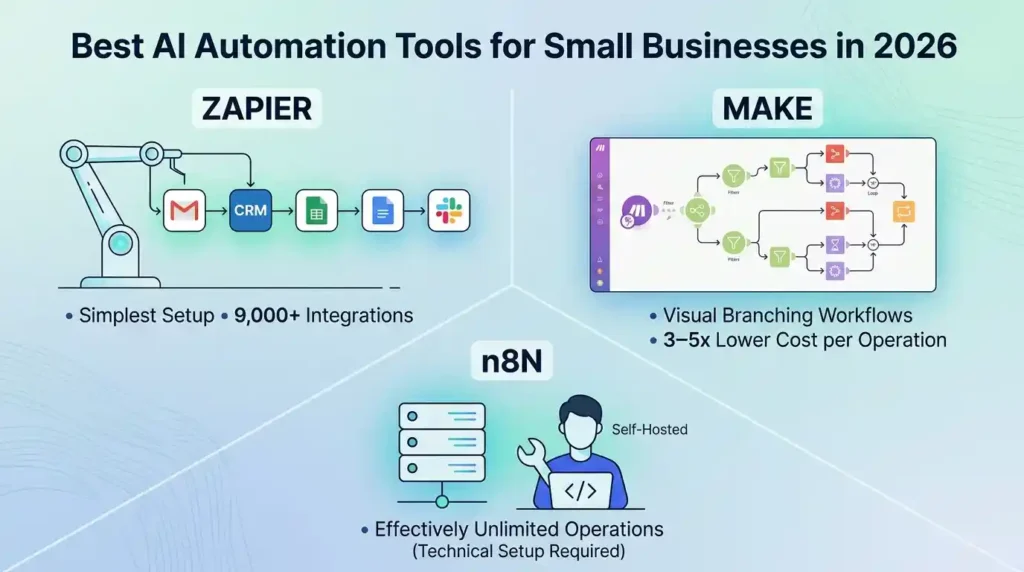
| Zapier | Non-technical teams wanting the simplest setup | 9,000+ integrations, easiest learning curve, Tables/Forms included | Most expensive per task once volume grows |
| Make | Technical users and cost-conscious teams needing complex logic | 3–5x cheaper per operation, visual canvas for branching workflows | Steeper learning curve; credit system requires active monitoring |
| n8n | Developers wanting full workflow ownership | Self-hosted option with effectively unlimited operations | Requires technical setup and server management |
Zapier
Zapier uses a linear, step-by-step editor: pick a trigger, add action steps, done — most people build their first automation (“Zap”) in under 10 minutes with no training. Its integration library of 9,000+ apps is the largest in the category, which matters if your business runs on niche or newer software that competitors haven’t built native connectors for yet. Zapier now includes MCP support and AI-powered Agents and Chatbots as add-ons, letting you connect AI directly to your existing app stack.
Pricing checked: July 2026. Free: 100 tasks/month, single-step Zaps only, 5 Zap limit. Professional: $19.99/month billed annually (about $29.99 monthly), 750 tasks, unlimited multi-step Zaps. Team: $69/month annually, 2,000 tasks, 3 users. Enterprise: custom pricing, unlimited users and tasks. Each action step in a multi-step Zap counts as a separate task, so real-world usage adds up faster than the headline task count suggests.
[CTA: View Current Zapier Pricing → AFFILIATE LINK]
Make
Make (formerly Integromat) uses a visual canvas where every module, route, and connection is visible as a flowchart, rather than Zapier’s linear list — a genuine advantage once workflows involve branching logic, loops, or conditional routing. It bills by “operations” rather than tasks, and because a single Zapier task often maps to multiple cheaper Make operations, real-world costs typically run 3–5x lower at comparable volume, though the credit system takes more active attention to monitor since nearly every step (including polling and filters) consumes credits.
Pricing checked: July 2026. Free: 1,000 operations/month, 2 active scenarios. Core: around $9–$10.59/month annually, 10,000 operations. Pro: around $16–$18.82/month annually, adds priority execution and custom variables. Teams: around $34/month annually, adds team management. Enterprise: custom pricing. Unused operations roll over one month on paid plans, which Zapier’s task system doesn’t offer.
n8n
n8n is the developer-oriented option: self-hosted, with effectively unlimited operations once you’re paying only for your own server costs (roughly $10–20/month for hosting). It requires real technical comfort to set up and maintain, so it’s a fit for businesses with in-house technical capacity rather than small teams wanting a fully managed, no-code experience.
Frequently Asked Questions
Should a small business start with Zapier or Make?
Start with Zapier if you’re new to automation and want the fastest path to a working workflow. Switch to (or start directly with) Make if you’re already comfortable with visual/technical tools and want to keep automation costs down as volume grows.
Is Make really cheaper than Zapier?
Generally yes at volume, but the comparison isn’t perfectly apples-to-apples — Make’s operations and Zapier’s tasks aren’t counted the same way, and Make’s credit system charges for steps like polling and filters that can add up faster than expected. Map out a real workflow’s step count before assuming the headline price difference holds.
Can I use AI models directly inside these automation tools?
Yes, both platforms have native modules for OpenAI, Anthropic Claude, Google Gemini, and other major AI providers, letting you add text generation, classification, or analysis steps directly into a workflow without separate API integration work.
What happens if I exceed my monthly task or operation limit?
Zapier pauses affected Zaps until the next billing cycle resets your task count, though you can buy additional tasks or upgrade mid-month. Make similarly requires a plan upgrade or credit pack purchase once you exhaust your monthly operations.
Final Verdict
For most small businesses just starting with automation, Zapier’s simplicity and integration breadth make it the safer first choice — you’ll be running your first workflow within minutes, and its 9,000+ app library means whatever niche software you use is more likely to be natively supported. Once your automation volume grows or you’re spending more than roughly $30–$50/month on Zapier, Make’s visual canvas and 3–5x lower cost per operation become worth the steeper learning curve. Technical teams with in-house development capacity should also consider n8n, where self-hosting removes the operations ceiling entirely for the cost of server hosting alone.
[CTA: Check Current Zapier Plans → AFFILIATE LINK]
